
Workflow
Review localization with local teams
Localization works best when the people who understand each market can focus on judgement rather than rewriting everything from scratch.
Localizethat gives each market its own review workflow, with one active reviewer per market.
Review happens by market
Each market is reviewed independently.
The active reviewer for Sweden can work independently of the active reviewer for the Netherlands, and each market can move through the workflow at its own pace.
Simplified example
Sweden
Reviewer · Erik
7 of 7 approved
Netherlands
Reviewer · Anna
5 of 7 approved
Due tomorrow
Invite the right reviewer
You can invite the active reviewer for a specific market by email.
The review link gives them access to that content in that market without giving them access to the rest of your Localizethat workspace.
No Localizethat account required.
External reviewers only see the content they have been invited to review. They do not get access to your other localizations, Brand Context, translation memory, glossary, claims or workspace settings.
Set a deadline
When sending a localization for review, set the date the review should be completed.
The deadline stays visible in the review workflow so the person managing the localization can see what is waiting, what is in progress and what is overdue.
Review statuses
A manual action — reminders are not sent automatically.
Review one content item at a time
The review interface keeps the source and localized content together so reviewers can evaluate each content item in context.
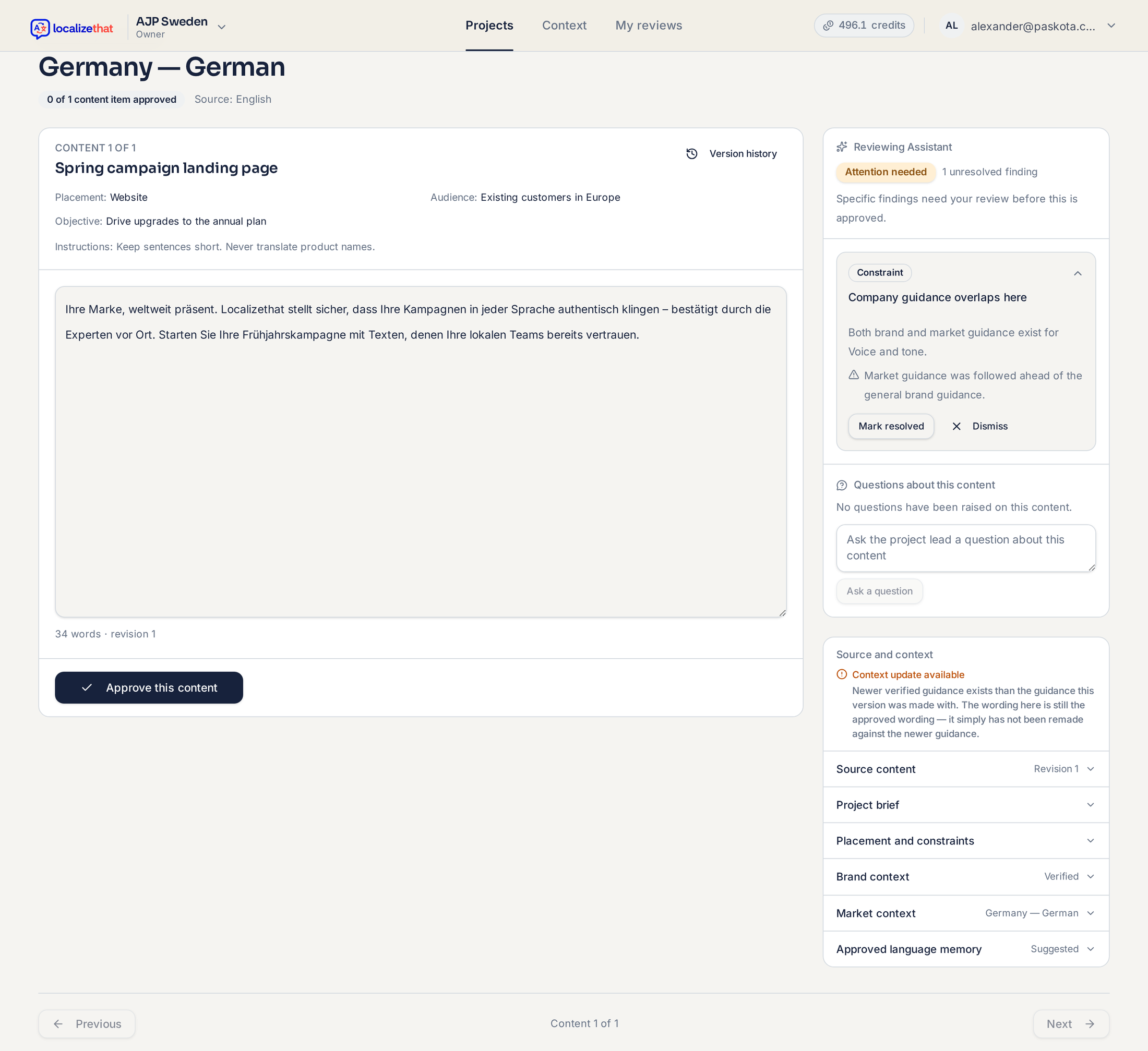
Source · English
[source content]
Dutch · Nederlands
[localized content]
Reviewers can focus on the current content item without navigating the rest of the workspace.
Comments and suggested edits
Not every issue requires rewriting the localized text directly. Reviewers can leave comments or suggest changes when something needs clarification or adjustment.
Suggested edits remain review decisions until they are accepted. A suggested edit does not automatically overwrite the localization.
Review decision
The Reviewing Assistant flags attention, it never approves
Alongside human review, the Reviewing Assistant can highlight content items that may need a closer look. It surfaces one of three outcomes for a content item in a market.
No issues found
Attention needed
Local judgment recommended
These outcomes are guidance, not a decision. Approval always happens per content item in a market, made by the active reviewer or the person managing the localization — never by the Reviewing Assistant.
See what is still waiting
The person managing the localization should be able to see the status of every market in one place.
Review overview
Netherlands
Anna
5 of 7 approved
Due tomorrow
Sweden
Erik
7 of 7 approved
Germany
—
This makes review coordination part of the localization workflow rather than a separate email and spreadsheet process.
External reviewers are free
Inviting someone to review a market does not require adding them as an internal Localizethat user.
This lets companies involve local teams, subject-matter experts or external partners without creating a new paid account for every reviewer.
Finished reviewing?
Once content is approved in a market, it is ready to deliver and export.
Related guides
Getting started with Localizethat
The core workflow: localize, review, approve and deliver.
Create your first localization
Walk through choosing content type, source, languages and localization.
Build your Brand Context
Set up the brand voice, terminology, claims and rules Localizethat should understand.
Deliver and export
Check readiness and export approved content per market.